



At CCLD, we’re here to support you—whether you’re a recent graduate taking your first steps into the professional world or a seasoned professional exploring new career opportunities. Our dedicated team provides personalized guidance tailored to your career and leadership goals, ensuring that you have the resources and support you need at every stage of your journey.
Our Services for Alumni Include:
- Virtual Career Coaching Corner:
- Join our monthly virtual workshops on emerging career topics such as job search strategies, professional development, and industry trends. These sessions are open to all ODU alumni and accessible through Handshake. View the full schedule and upcoming sessions here.
- Personalized Career Coaching:
- Receive expert advice and personalized career support from one of our experienced career coaches. Schedule a one-on-one consultation through Handshake using the Career Center tab to get started. Virtual appointments are available via Handshake for your convenience.
- Job Search Assistance:
- Explore our comprehensive job database on HANDSHAKE, where you can search and apply for hundreds of entry-level, mid-career, and professional roles across industries.
- Career Resources Hub:
- Access a wide range of tools to enhance your job search, including resume guides, interview tips, networking strategies, and more. Whether you’re preparing for a career change or moving up in your field, our resources will help you stand out.
- Career Fairs and Networking Events:
- Attend our virtual and in-person career fairs to connect with employers and expand your network.
Take the next step in your career journey with confidence—schedule your career coaching session today and unlock the full potential of our career services.
Using Handshake After Graduation
As you transition from student to alumni, you will continue to have access to Handshake for job searches, employer messaging, and career resources. To ensure uninterrupted access after your ODU email deactivates, please complete the steps below.
Access link: https://odu.joinhandshake.com/edu
- Visit https://odu.joinhandshake.com/edu.
- Select Students & Alumni and choose Old Dominion University.
- Sign in using your ODU email.
- If you are redirected to ODU Single Sign-On (SSO), continue to Step 2.
Handshake requires personal login once your ODU SSO access ends.
- On the SSO screen, select “Or log in using your Handshake credentials.”
- Click Get Started.
- Check your inbox and open the Set My Password email.
- Create a password following the instructions provided.
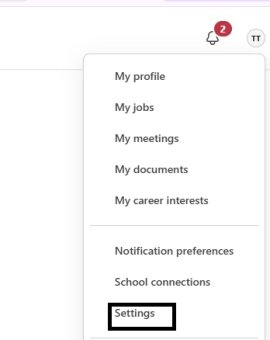
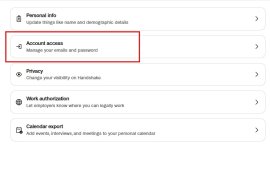
- Click your profile icon → Settings.
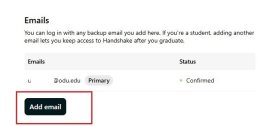
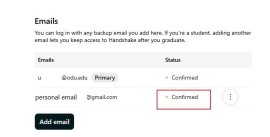
- Under Emails, select + Add another email.
- Enter your personal email and confirm it using the link sent to your inbox. (see below)
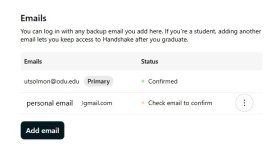
- Return to Settings → Emails.
- Select the three dots next to your personal email.
- Choose Make Primary.
- Navigate to your Profile.
- Update your Education section with your graduation month/year.
- Ensure your status reflects completion of your degree.