



This coming October, we will be upgrading all ODU-managed computers to the latest version of Windows 11 (version 25H2) to ensure our systems remain secure and supported.
Want to get ahead of the curve? You don’t have to wait until October. Starting today, this upgrade is available as an optional update that you can install at your own convenience and on your own schedule.
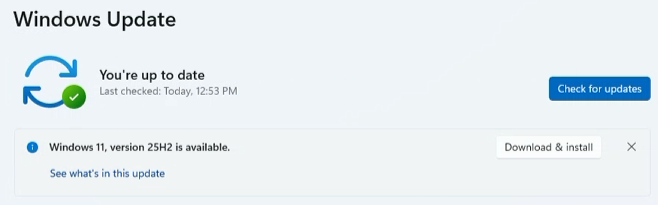
Because this is optional, it will not install automatically yet. If you would like to run the update yourself, please set aside 1 to 2 hours (we highly recommend starting this at the end of your workday) and follow these steps:
Before starting any major system update, please take a few minutes to safeguard your files:
If you run into any issues during the upgrade process, please reach out to the IT Help Desk at ithelpdesk@odu.edu. To help us assist you quickly, please include:
Thank you for helping us keep ODU's technology secure and up to date!